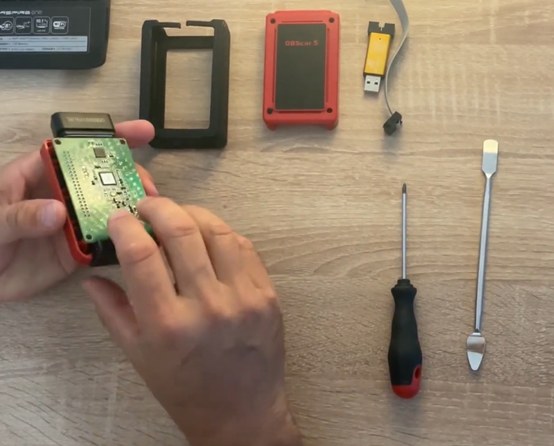
Not sure whether your device is compatible? Order a free OBD test.
Before flashing your OBD with XPRO5, make sure it’s compatible. Follow the steps, then order your free OBD test to confirm everything works.
Trusted by 145,000+ customers worldwide
Secure Licensing
Each subscription is locked to your device’s serial number, so access can’t be shared or leaked — it stays yours alone.
Instant Activation
The moment your payment clears, your subscription goes live automatically — no manual approval, no waiting around.
All Updates Included
We refresh the software database on a regular basis, so the newest vehicle coverage and fixes always reach you at no added cost.
Worldwide Coverage
Customers in 50+ countries rely on us, with several payment options and a multilingual interface to match.
Compatibility requirements
XPRO5 is upfront about what’s needed. Confirm your setup before flashing your OBD — see the trial FAQ for scanner and activation details.
Flashed OBD required
Your OBD must be flashed with the official XPRO5 boot files to be compatible.
Android only
Supports Android 7–13 and Android 14 32-bit. Not on iOS or Windows.
12-digit serial
Serial numbers must be 12 numeric digits — no letters, no spaces.
Follow the guide
Follow the step-by-step flashing guide carefully to avoid damaging your OBD.
Four steps to your free test
From serial check to your free XPRO5 test account. Four steps.
Check your serial
Enter your 12-digit OBD serial to confirm your device before flashing.
Download boot files
Get the official XPRO5 boot files and the detailed flashing guide.
Flash your OBD
Follow the step-by-step instructions carefully to avoid damaging your OBD.
Request free test
Once flashing is complete, request your FREE XPRO5 test.
Not ready to commit?
Test your scanner first.
Request your free XPRO5 test account to confirm your flashed OBD works before buying full access.
What you can count on
Confirmed policies. No invented claims.
Secure payment
Credit card and PayPal accepted. Your payment details go directly through secure systems. XPRO5 never stores your financial information.
Email delivery
Order confirmation sent immediately after purchase. A follow-up email delivers login credentials and step-by-step setup instructions.
Clear terms
Terms & Conditions are linked before checkout so digital goods refund rules are visible. Read Terms →
Free test & scanner questions
Everything about the trial version, supported scanners, and how activation works.
For Launch EasyDiag 2.0, EasyDiag 3.0, EasyDiag Plus, Golo 3, Golo 4, Golo 5 (Vpecker), M-Diag Lite, M-Diag Pro, M-Diag Mini, M-Diag Plus, DBScar (older versions), DBScar 3, DBScar 5, DBScar 7, HD3 Module, SmartLink C, SmartLink B, eDiag, eDiag Mini, eDiag Plus, and ThinkDiag 2 (Kingbolen) scanners, you’ll need to flash the scanner via STlink or Jlink programmers if it hasn’t been flashed for boot before.
Activation is available for scanners with numbers in the serial number only. Activation for scanners with letters is not possible.
For scanners that have not had previously activated brands, an official brand or EOBD is required.
To activate the test version you need the scanner number and an email for communication. The application and your account access (login and password) are sent to your email — check the SPAM folder, it sometimes lands there. Without confirmation, the test version will not be sent.
For verification you’ll be sent EOBD2. In the “brand you will connect to” field, specify the brand to check that car’s support of EOBD2 protocols. This module is enough to confirm the scanner’s functionality before purchasing brands.
After signing in to the application you can download the necessary files and modules and check functionality. The validity period and stamp download is 1 day after the data is sent.
If you have previously ordered a test stamp (including on a third-party resource), activation of the test stamp will be denied.
Get help with your OBD test
Stuck on flashing, the serial check, or the OBD test? Message us on your preferred app and our support team will help you out.
Flash, test, and activate XPRO5 today
Flash your OBD with the XPRO5 boot files, request your free test account, then buy your subscription. Secure payment via credit card or PayPal.